

MT2000 Series
Combines the simplicity of a scanner and the brainpower of a mobile computer in an ultra-ergonomic gun-style form factor.
The MT2000 series of mobile terminals offer highly flexible device capable of streamlining many scan-intensive business processes in a wide variety of industries—from the front to back door in manufacturing plants, retail establishments, warehouses, hospitals and more. The easy-to-use and affordable mobile terminal offers a unique hybrid design, functioning as both a scanner and a mobile computer throughout the business day. Its rugged ergonomic design ensures reliability in almost any environment.
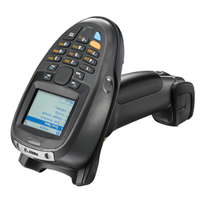
MT2000 Series Key Features and Benefits
Versatility and Value
- Eliminates need for separate bar code scanners, mobile computers, EAS deactivators and mobile RFID readers
- Entry level priced
- Compatible with Zebra’s flagship mobile device management solution, Mobility Services Platform (MSP)
- Service From the Start coverage available

Flexible Applications
- Preloaded with MCL client software
- Optional MCL designer software
- Microsoft.Net® framework
- Windows CE 5.0 operating system
Connectivity Options
- Bluetooth® technology for cordless connection to host device up to 300 feet away
- USB and RS-232 provides a flexible corded connection to host devices
- MT 2090 offers integrated 802.11 a/b/g for real-time direct application connectivity
- PCI compliant
Comprehensive Data Capture
- 1D laser scanner performs up to 50 inches away and on damaged and worn bar codes
- 2D imager captures 1D and 2D bar codes as well as signatures, images and video
- High speed scanning
- Checkpoint EAS compatibility
Rugged Ergonomics
- Same drop, tumble and temperature specifications as Zebra’s high-end rugged devices
- High resolution, high contrast QVGA Display
- Tempered glass exit window
- 21 key enhanced keypad
Adobe Reader is required to open and view PDF files. This can be downloaded free from adobe.com.
Available Documents
MT 2000 Spec Sheet- Choose from a wide range of 203, 300 and 600 dpi print engines
- Capable of handling print speeds up to 16 ips
- Numerous I/O’s ease interfacing with external devices
- Monitor the labeller’s operation via a web browser
- Available with optional RFID capability
- An easy way to add a two-sided labeller after your palletiser system
Special labels
Special labels by Weber Marking Systems meet the most diverse of requirements and have numerous specialized features, depending on their purpose.
View ProductSATO CT4 Series
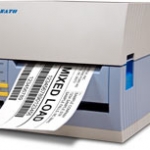
At the core of the CT4i printers is a new generation ultra high speed processor.
View ProductGeset 117 Top and Bottom Labelling System
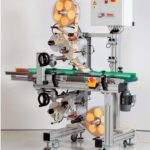
The Geset 117 labelling system is used to label square products on the top and bottom side automatically. Depending on the type and dimension of the product, different label sizes are used. The products are fed manually or by a conveying system provided by the customer at an infeed passage on the labelling system. Care should be taken on accurate alignment of the products. It is essential that the products are forwarded separately to the applicator with a gap between each other.
When the light barrier is reached, an application trigger is tripped. Both label applicators apply then in Wipe On procedure a label onto the product. The label on top side is pushed on the product by a brush or roller. The label on bottom side is pushed on the product by the self-weight of the product. After labelling the products move on and can be removed from conveyor by the customer.
View ProductModel 5300 Series Dual-Label Pallet Label Printer-Applicator
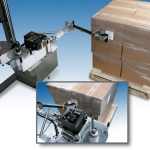
Weber’s Model 5300 Dual-Label pallet labelling system combines a high-performance thermal/thermal-transfer label printer with a specially-engineered articulating swing-tamp applicator to perform the printing and two-label, adjacent-side labelling of pallets in-line.
View Product







