

EasyGo! POS Pro
Summary
Improve the shopping experience of your customer with EasyGo! POS Pro. Your customer will use a mobile device while shopping and scan the products on the fly. Once your customer is at the cash register, the shopping list will already be in your POS system or printed for be scanned later (at moment of paying, for example). Just do a final review and charge your customer. Easy and fast!

Description
EasyGo! POS Pro is an application designed to make the live of your customer easier. With this application, your customer will be able to:
– Scan the items bought so they are automatically added to the shopping list while they are collected in your shop.
– Review both the items picked and the total price. Correct the shopping list if necessary.
– Avoid long queues at the checkouts, improve customer satisfaction.
In addition to using this application as a queue busting app, it can also be used as wedding or birthday gift-lists. Imagine the process of creating a wedding or birthday gift list. Why looking at huge catalogs? Just let your customer walk through the store and scan the desired products.
Languages
- English
- Spanish
- French
- Dutch
- German
- Italian


Adobe Reader is required to open and view PDF files. This can be downloaded free from adobe.com.
Available Documents
- Print speed up to 305 mm per second
- Left or right handed available
- Robust industrial design
- Easy Connectivity
- Especially for Print & Apply designed systems
- RFID ready!
Sato M84Se Printer
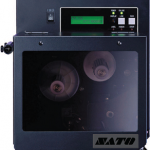
FEATURES
RL4e
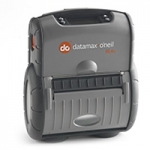
Datamax-O’Neil built its reputation on rugged and reliable portable receipt printers and has now used this expertise to design the industry’s most rugged portable label printer. The RL4e (4-inch/102mm) is a durable direct thermal printer with a rugged design and reliable performance that will continue to operate long after other printers have failed. We’re so confident in the quality and long-term reliability of this rugged printer that we include a 2-year warranty free of change.
Anybody who’s ever been in a warehouse knows that when shipments are processed more quickly and effectively, productivity is increased and errors are reduced. The RL4e improves efficiency and productivity by allowing workers to print and apply barcode labels directly at the point of application. Using an RL4e to print on-demand labels also eliminates the danger of mixing up batch-printed labels and saving thousands of dollars in potential shipping errors. The portable printer can even be mounted on fork trucks for added convenience and versatility.
We’ve made integration easy. Replace existing label printers using Datamax-O’Neil’s language emulations. The RL4e is compatible with most popular warehouse management software programs, independent label design programs and remote management packages.
View ProductMarkoprint ZTV HP
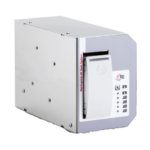
The Markoprint ZTV HP is a Central Ink Supply (CIS) system stores up to 400ml of ink for Markoprint HP Class inkjet printing systems such as the Markoprint integra One, Markoprint X2JET / X4JET, and Markoprint integra Quadro.
The large ink tank prevents frequent cartridge replacements from lowering your Overall Equipment Effectiveness (OEE). It can hold up to four single HP cartridges repaying you rapidly thanks to reduced ink prices. For non-interrupted production, the system can be paired with our NonStopPrinting printhead. Using an interface directly on the cartridge, current ink filling levels are monitored in real time. When the levels in the bulk tank fall below a certain threshold, a valve to the bulk tank opens and automatically refills it.
View ProductModel 5300 Series Pail/Drum Label Printer-Applicator
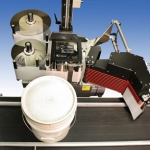
The fully-automatic system that quickly and accurately prints and applies labels to pails or drums on the production line.
• Fully automatic pail/drum labelling system
• Ideal for rough production conditions
• High-grade label printing in a single operation
• Prints and applies labels up to 7″ x 14″
• Labels up to 30 products per minute
• Print resolution up to 600 dpi
• All conventional data interfaces
• Service interval display
• Display controller for simple operation
• Easy integration
• CE certification







