

SATO DS Keyboard
The clever and compact SATO Smart Keyboard enables you to use your label printer independent from computers or networks.
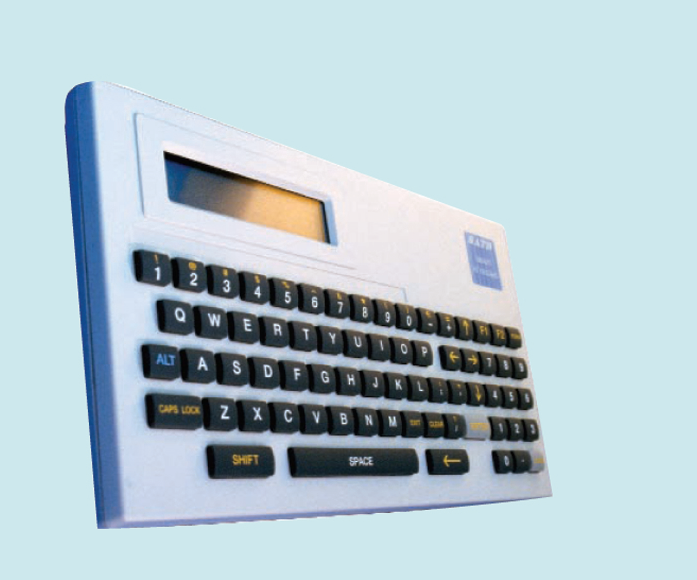
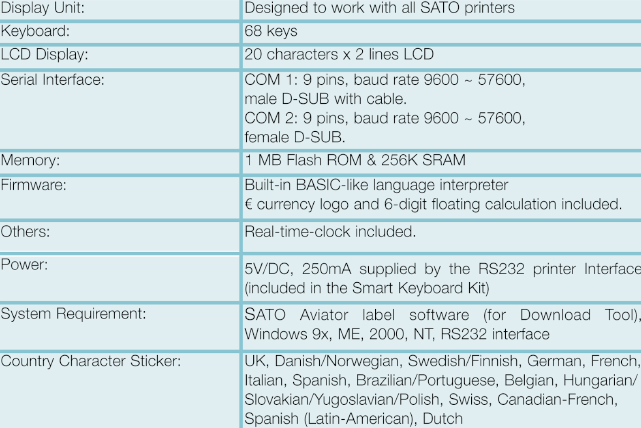
Either produce your labels direct, with the Smart Keyboard, or even easier, save your labels designed in SATO Dynamic Aviator or Dynamic Publisher direct in the memory of the keyboard, using the Downloader tool. The intelligent SATO Smart Keyboard is the perfect answer for real stand-alone label production.
Adobe Reader is required to open and view PDF files. This can be downloaded free from adobe.com.
Available Documents
DS-keyboardX1Jet HP Premium MK2
The innovative Markoprint X1JET HP inkjet printer codes absorbent and semi-absorbent surfaces quickly, accurately and reliably. It is designed for a different range of applications in the food and beverage industry as well as the chemical and pharmaceutical industry. The controller and printer are combined in one single unit, making the system extremely compact.
View ProductEasyGo! Replenishment
Summary
Use this helpful application to assist your personnel in the process of replenishment at your warehouse, market or business. You can view all items to be replenished or search them by code or description, and introduce the quantity you will replenish quickly and easily. Use the review option to see the replenished items, and eventually modify the quantity. Finally, send the file report to the server by cradle or WIFI.
View ProductModel 5300 Series Air-Blow Label Printer-Applicator
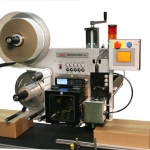
This Weber exclusive provides high-resolution printing and high-speed operation combined with the dependable air-blow method of label application.
•Choose from a wide range of 203, 300 and 600 dpi print engines
•Capable of handling print speeds up to 16 ips
•Numerous I/O’s ease interfacing with external devices
•Monitor operation via a web browser
•Available with RFID capability
EasyGo! PriceCheck
Summary
Let your customers check on the fly the price of products they are buying at your store. Improve customer satisfaction and customer experience with this self-service application. Designed for a wall-mounted device, your customers are able to check the price, get product information, and even get a picture of the product they are buying just by reading the product’s barcode. So, no matter where in the store your customers might be, help is never more than a few steps away with EasyGo!PriceCheck.
View Product






