

TC8000 Touch Computer
A revolutionary design delivers revolutionary productivity gains…one more hour, per worker, per shift.
Businesses looking for the next innovation in warehouse mobility to boost warehouse productivity, have just found it: the rugged TC8000. What makes the TC8000 so special? Everything
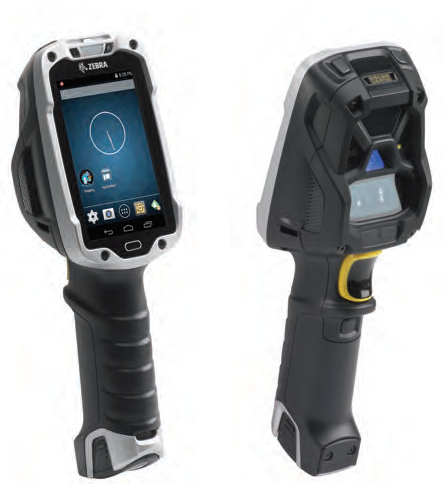
Superior ergonomics for superior productivity and worker comfort
The new scan angle eliminates the constant tilting that traditional designs required to view the screen, increasing productivity by 14%* by reducing wrist motion by 55% and muscle effort by 15%.
* Results are dependent upon use case and scan frequency.
Enterprise-class Android KitKat
Mobility Extensions (Mx) transforms Android™ to an enterprise-class OS, providing enterprise-class security, device management and data capture capabilities.
Rugged and ready for the warehouse
The super-rugged design is built for the challenging warehouse environment. With Zebra’s most extreme impact ratings, the TC8000 operates reliably, even after 2,000 consecutive hits when tumbling and multiple 8 ft./2.4 m drops to concrete. The TC8000 is sealed, ready to handle jetting water and dust. The TC8000 is built to handle constant temperature swings between extreme heat and cold—ideal in outside yards.
An industry first: hands-free proximity scanning with a handheld device
The device can be automatically triggered by the proximity sensor, whether the TC8000 is worn in the hip holster, on the shoulder strap, in the cart mount or desktop mount. Two modes are available: near, for close-up scanning from near contact to 6 in./15 cm; and far, from contact to 1.96 ft./60 cm.
Advanced bar code scanning options
Zebra’s SE4750 imager with proprietary PRZM Intelligent Imaging technology offers unparalleled performance on just about any type of data imaginable—from 1D and 2D bar codes to fully searchable and editable documents. The SE965 engine provides best-in-class 1D scanning performance with patented Adaptive Scanning technology that delivers the widest working range in its class. All options capture bar codes in practically any condition.
Transform “green screens” to elegant all-touch screens with no host modification or coding
All-touch Terminal Emulation gives the front end of Terminal Emulation apps a smart and intuitive touch interface, automatically—and legacy TE green screens are always available to workers at the press of button.
Adobe Reader is required to open and view PDF files. This can be downloaded free from adobe.com.
Available Documents
TC8000_SSEasyGo! ProductCheckPro
Summary
Manage your stock by checking the properties of your products and verifying they are correct. Alert, by incidents, the failures of the products checked. Send the incident report to the server to solve it or to have a movement report. Finally, print product related labels from your handheld device via cable, WiFi or Bluetooth.
View ProductEasyGo! In&Out&Dispatch
Summary
Manage your receiving, shipping and warehouse transfers with a simple, customizable and quick application. When completing a receipt and shipping process in a warehouse mainly order number, product ID and involved quantity are required. In the case of warehouse transfers will take place (dispatch) additional information such as source and destination location next to the product ID and quantity are needed. EasyGo! In&Out&Dispatch will manage the registration of incoming and outgoing goods into your warehouse. Additionally it allows an ‘automatic mode’ for receiving, shipping and dispatching; simply read the product barcodes and the application will do the rest!
View ProductZebra FS10 Fixed Industrial Scanner
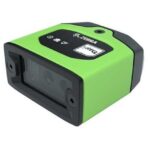
A Quick & Compact Scanning Solution
The increasing demands on international commerce and its global supply chain are pressurising businesses to deliver more and deliver faster. From manufacturing to logistics to the end customer, success is driven by the ability to move quickly and track the products that drive your business.
Now you can address it all with the compact Zebra FS10 Fixed Industrial Scanner. With a slim profile, the FS10 fits easily everywhere you need scanning. Just plug the FS10 into the USB port of a workstation, laptop, tablet or any other host device to dependably capture barcode data, from assembly to storage and fulfilment.
View ProductWeber LA 6000 Labelling System
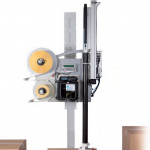
High Performance Labelling System for Warehouse & Logistics
Modularity, High Performance necessary for Warehouse and Logistics System Solutions
View ProductTC8000 Touch Computer
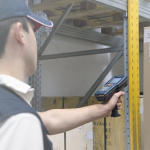
A revolutionary design delivers revolutionary productivity gains…one more hour, per worker, per shift.
Businesses looking for the next innovation in warehouse mobility to boost warehouse productivity, have just found it: the rugged TC8000. What makes the TC8000 so special? Everything
Superior ergonomics for superior productivity and worker comfort
The new scan angle eliminates the constant tilting that traditional designs required to view the screen, increasing productivity by 14%* by reducing wrist motion by 55% and muscle effort by 15%.
* Results are dependent upon use case and scan frequency.
Enterprise-class Android KitKat
Mobility Extensions (Mx) transforms Android™ to an enterprise-class OS, providing enterprise-class security, device management and data capture capabilities.
Rugged and ready for the warehouse
The super-rugged design is built for the challenging warehouse environment. With Zebra’s most extreme impact ratings, the TC8000 operates reliably, even after 2,000 consecutive hits when tumbling and multiple 8 ft./2.4 m drops to concrete. The TC8000 is sealed, ready to handle jetting water and dust. The TC8000 is built to handle constant temperature swings between extreme heat and cold—ideal in outside yards.
An industry first: hands-free proximity scanning with a handheld device
The device can be automatically triggered by the proximity sensor, whether the TC8000 is worn in the hip holster, on the shoulder strap, in the cart mount or desktop mount. Two modes are available: near, for close-up scanning from near contact to 6 in./15 cm; and far, from contact to 1.96 ft./60 cm.
Advanced bar code scanning options
Zebra’s SE4750 imager with proprietary PRZM Intelligent Imaging technology offers unparalleled performance on just about any type of data imaginable—from 1D and 2D bar codes to fully searchable and editable documents. The SE965 engine provides best-in-class 1D scanning performance with patented Adaptive Scanning technology that delivers the widest working range in its class. All options capture bar codes in practically any condition.
Transform “green screens” to elegant all-touch screens with no host modification or coding
All-touch Terminal Emulation gives the front end of Terminal Emulation apps a smart and intuitive touch interface, automatically—and legacy TE green screens are always available to workers at the press of button.
Adobe Reader is required to open and view PDF files. This can be downloaded free from adobe.com.
Available Documents
From the Craft to the Cure!Warehousing
ZEBRA ZT600 Series Industrial Printers
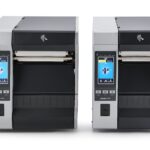
ZEBRA ZT600 SERIES – INDUSTRIAL BRAWN FOR EVERY CHALLENGE
Advancing the legacy of the industry-leading Xi Series, the Zebra ZT600 Series printers combine rugged durability and exceptional performance on a user-friendly, future-ready platform.
To keep your critical operations running smoothly, you need high-performance industrial printing systems that can stand the test of time, both physically and technologically. Zebra’s ZT610 and ZT620 advance the legacy of their industry leading Xi Series predecessors, offering next-generation operational visibility, control and adaptability to meet your evolving needs—all with the rugged durability and 24/7 reliability you expect from Zebra.
View ProductArmor AWR6 Thermal Transfer Ribbons
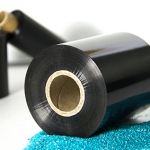
AWR6 is a wax ribbon highly recommended to print smooth label materials like glossy papers or some synthetics, providing a wax printing solution with relatively good resistance on high quality label materials.
View ProductAxicon 12000 2D Barcode Verifier
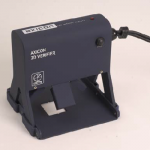
The Axicon 12000 2D verifier is designed to give repeatably highly accurate results when verifying Datamatrix and similar barcodes. The Axicon 12000 conforms to all of the latest ISO, GS1 and Pharmaceutical standards – and the Axicon 12000 has pioneered the AI content checking for the different pharmaceutical requirements (CIP, Turkish Ministry of Health, etc). The Axicon 12000 is designed for all 2D barcodes where an aperture size of 3mil or more is required (up to the scan area available – see scan area details overleaf) – the user can set the aperture either directly or by specifying a required Application Standard.
View Product






